My Setup (Q3 2025)
Update - The Apple MacBook Pro was updated to an M5 Max. The Home Lab was updated to include the NVIDIA DGX Spark.
I switch between three systems (one desktop and two laptops), which are primarily used for productivity, collaboration, software development, photo editing, video editing, virtual labs, gaming, and game development.
My daily driver (home and travelling) is an Apple MacBook Pro 14-inch (MAR-2026), which delivers an excellent balance of performance, battery life and portability. It is also well-positioned to handle tasks that require significant memory and/or memory bandwidth (e.g., local AI Models), alongside the ability to run software natively designed for the Mac, such as Xcode and Final Cut Pro.
The full specification can be found below:
- Apple MacBook Pro 14-inch (MAR-2026)
- Apple M5 Max (18-core - 6 Super / 12 Performance)
- 40-core GPU
- 16-core Neural Engine
- 128GB Unified Memory (614GB/s Memory Bandwidth)
- 2TB SSD (7.4GB/s Read)
- Wi-Fi 7 and Bluetooth 6
- 3x Thunderbolt 5, HDMI 2.1, 3.5mm Headphone, SDXC Card Reader
- 14.2-inch Liquid Retina XDR Nano-texture Display (3024x1964 @ 120Hz)
My second system is a custom-built desktop PC, running Linux (Bazzite, based on Fedora Silverblue). This system is used to run software optimised for NVIDIA, specifically games and their parallel computing platform and programming model, known as CUDA.
The full specification can be found below:
- MSI MAG X870 Tomahawk WiFi
- AMD Ryzen 9 9950X 4.3GHz Base / 5.7GHz Boost (16C/32T)
- Noctua NH-D15 G2 LBC CPU Cooler
- 64GB Corsair Vengeance EXPO DDR5 PC5-48000C30 6000MHz RAM
- 2TB Crucial T705 M.2 PCI-e Gen5 NVM-e SSD
- 2TB Samsung 990 EVO Plus M.2 PCI-e Gen5 NVM-e SSD
- NVIDIA GeForce RTX 5090 Founders Edition 32GB GDDR7
- Corsair HX1200i 1200W ‘80 Plus Platinum’ ATX PSU
- Fractal Torrent Compact
The AMD Ryzen 9950X and NVIDIA GeForce RTX 5090 are high-performance components, delivering excellent performance across a range of workloads (e.g., multi-threading, ray-tracing gaming, machine learning, video editing, etc.).
Finally, I use an HP ZBook Ultra G1a running Linux (Fedora Workstation) for Linux-specific workloads (e.g., Linux Containers, Ethical Hacking, etc.)
The full specification can be found below:
- HP ZBook Ultra G1a
- AMD Ryzen AI Max+ 395 3GHz Base / 5.1GHz Boost (16C/32T)
- 128GB LPDDR5x-8000 Unified Memory
- AMD Radeon 8060S Graphics (40 Graphics Cores)
- 2TB M.2 2280 TLC NVM-e SSD
- MediaTek Wi-Fi 7 MT7925 (Wi-Fi 7 and Bluetooth 5.4)
- 2x Thunderbolt 4, 1x USB-C, 1x USB-A, HDMI 2.1, 3.5mm Headphone
- 14-inch OLED Display (2880x1800 @ 120Hz)
At home, all systems connect to a 57-inch Super Ultra-Wide monitor, specifically the Samsung G95NC Odyssey Neo G9 240Hz Dual UHD Monitor.
The full specification can be found below.
- Model: Samsung G95NC Odyssey Neo G9
- Panel Size: 57-inch
- Panel Type: VA (Quantum Mini LED - 2,392 Zones)
- Panel Curvature: 1000R
- Aspect Ratio: 32:9
- Resolution: 7680x2160
- Refresh Rate: 240Hz
- Variable Refresh Rate: AMD FreeSync Premium Pro
- Response Time: 1ms (GTG)
- High Dynamic Range: HDR10+ Gaming, VESA DisplayHDR 1000
- Brightness: 420cd/㎡ (Typical), 1000cd/m2 (Peak)
- Interface: 3x HDMI 2.1 (HDCP 2.2), 1x DisplayPort 2.1 (HDCP 2.2)
My workspace is minimal, thanks to the exceptional Secret Lab Magnus Pro XL sit-to-stand desk. The monitor is mounted on a BenQ Ergo Arm BSH01, which is a heavy-duty monitor arm that can (just about) support the 15.4 kg weight of the Samsung G95NC Odyssey Neo G9.
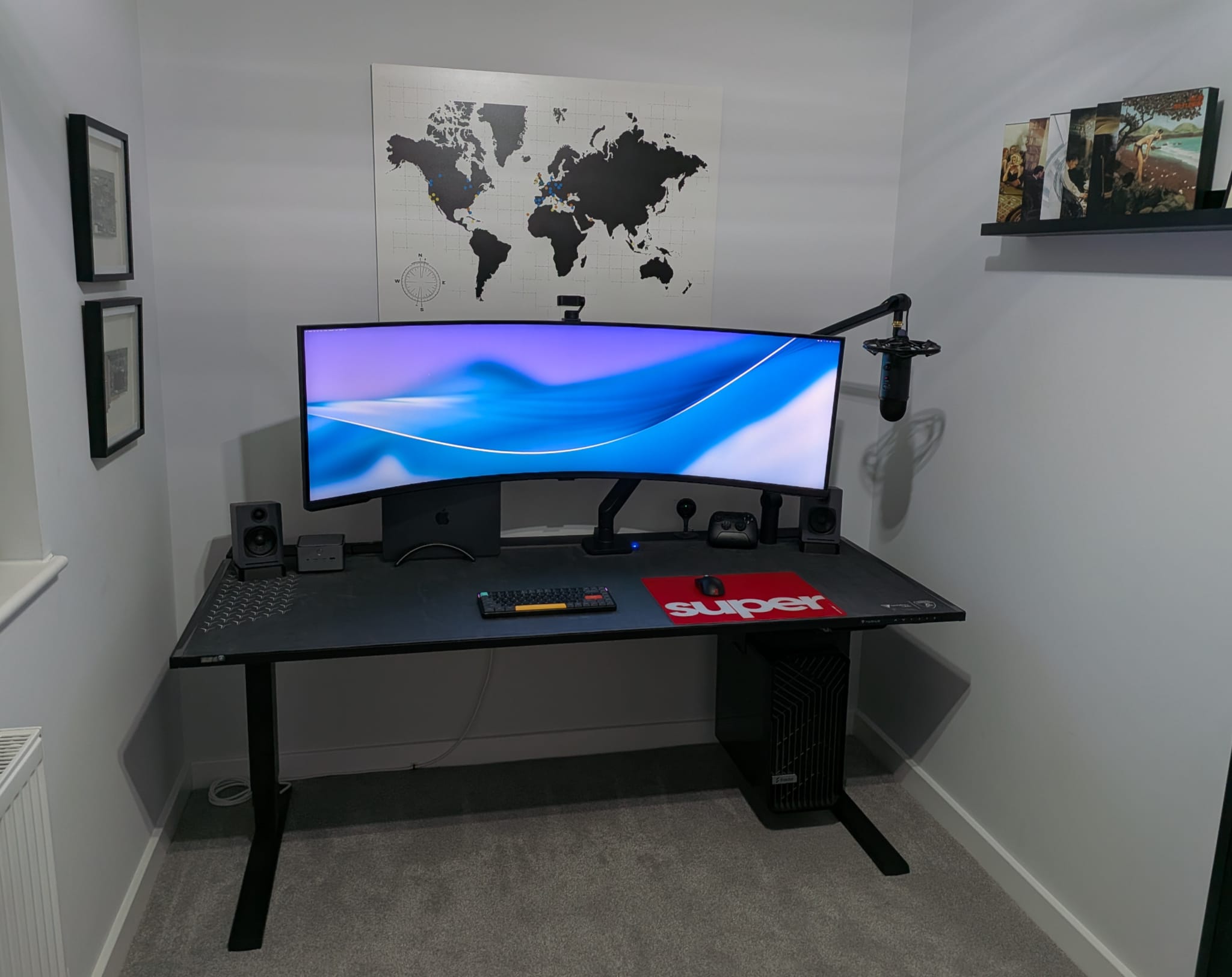
Regarding peripherals, I primarily use the NuPhy Air75 V2 (Wisteria Switches), Pulsar X2 v3 eS Mini Gaming Mouse and Insta360 Link 2. The keyboard and mouse were selected as they support multiple Bluetooth profiles, making it simple to switch between devices. The mousepad is a Pulsar Superglide Glass Mousepad v2, which delivers very low friction and accurate tracking.
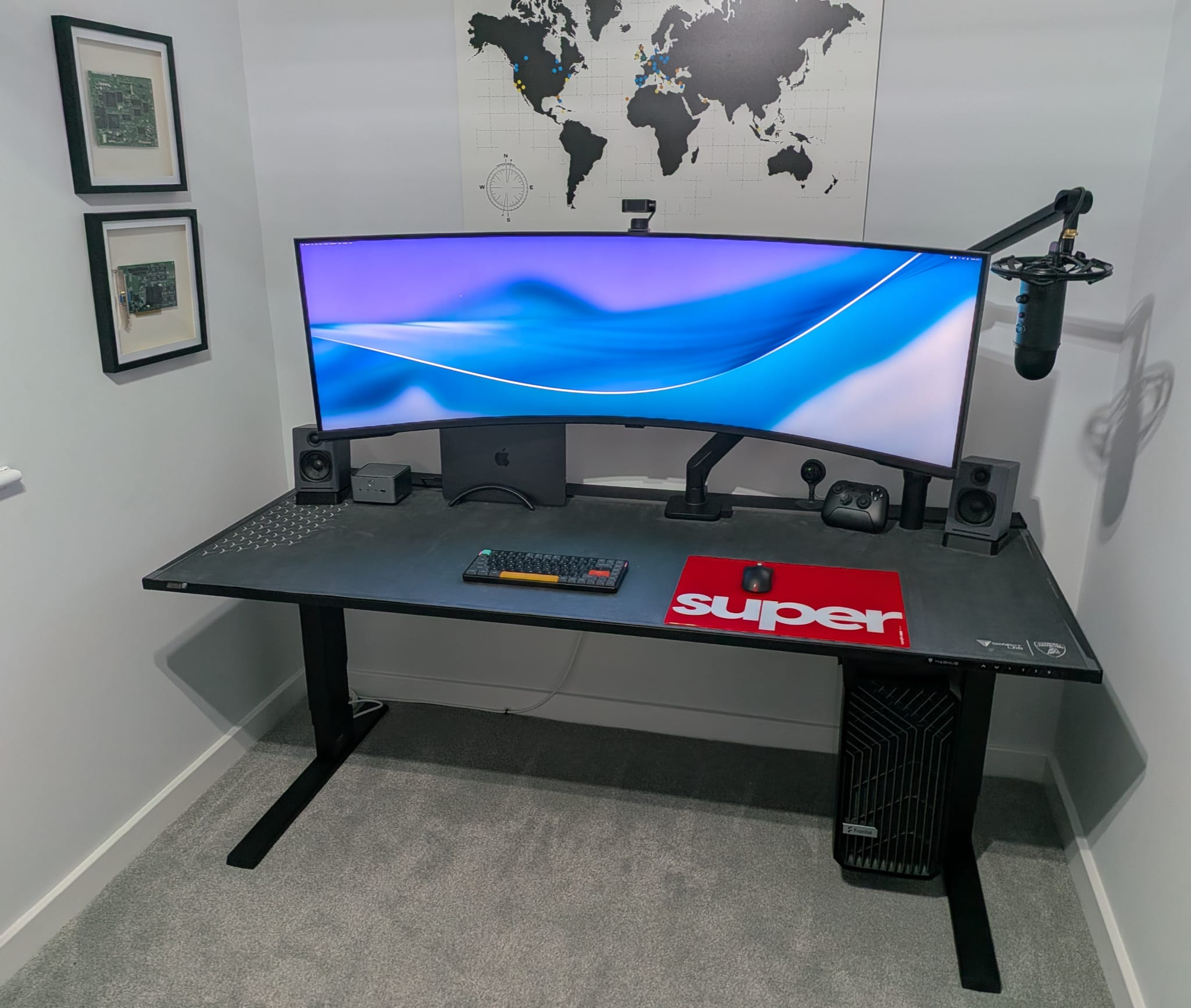
The photo also highlights my microphone setup, which is a Blue Yeti connected to the Blue Yeticaster that includes the Compass Boom Arm and Radius III Custom Shockmount. The microphone is primarily used for video conferencing, screencasting, webinars, and podcasts.
Additional peripherals include the Audioengine A1 Home Music System w/ Bluetooth aptX, Shure AONIC 5 Sound Isolating Earphones, 8BitDo Ultimate 2 Wireless Controller, and two virtual reality headsets, specifically the Meta Quest 3 and Apple Vision Pro.
As highlighted in the photo below, the desktop PC is mounted to the desk using the Secret Lab Premium PC Mount, with the PC case door exposed, providing easy access to the components.
Accompanying the desktop PC and monitor is a Bambu Lab P1S 3D printer with Automatic Material System (AMS).

Finally, I use a Fractal Design Refine chair, which balances comfort and personalised ergonomics.
Home Lab
Alongside my desktops and laptops, I have a UGREEN NAsync DXP2800 Network Attached Storage (NAS), which acts as a small home server. The server manages local and cloud backups, server-side workloads (Virtual Machines and Docker), as well as media streaming.
The full specification can be found below.
- UGREEN NAsync DXP2800
- Intel N100 3.4GHz (4C/4T)
- 8GB DDR5 4800 MT/s
- 1x eMMC 32GB (OS Installation)
- 2x SATA, 2x M.2 SSD (Maximum 76TB)
- 1x SD Card Reader
- 1x USB-C, 1x USB-A (10Gb/s), 2x USB-A (480Mb/s)
- 1x HDMI
- 1x 2.5Gb/s Ethernet
In addition to the base specification, I installed two 4TB Western Digital Red Plus Hard Disk Drives (5400RPM), a single internal 1TB Solid State Drive, and a 2TB SanDisk Solid State Drive connected externally via USB-C.
The Hard Disk Drives are configured in RAID 1 (mirroring), with the internal Solid State Drive reserved for applications (e.g., Virtual Machines, Docker, etc.) The external Solid State Drive provides a third level of removable backup.
Finally, I have an NVIDIA DGX Spark, which offers a home-friendly option to prototype, fine-tune, and deploy large AI models, using the proprietary NVIDIA AI platform (e.g., NVIDIA CUDA) and tools (e.g., NVIDIA AI Workbench